
The system in 30 seconds
The website, the member app and the staff panel, with the real Phoenix Academia screens. The video has music, and its text (in Portuguese) is on screen.
In the video: “Your gym with its own app? Website, app and panel under your brand.” The website, with plans, trial class and online sign-up. The member app, with the day’s workout, which opens even offline, and 120 exercises demonstrated by the mascot. The staff panel, with the workout builder, billing with Pix and card, check-in and class booking. “Live at Phoenix Academia, in Itobi (SP).” “Want one like it for your gym?” Made by Ignotti, ignotti.com.
Three parts, one brand: your gym’s

Gym website
- Plans, classes, facilities and staff with each trainer’s CREF registration
- Trial class requests
- Online sign-up, activated only once the payment is confirmed
- Contract signed by link
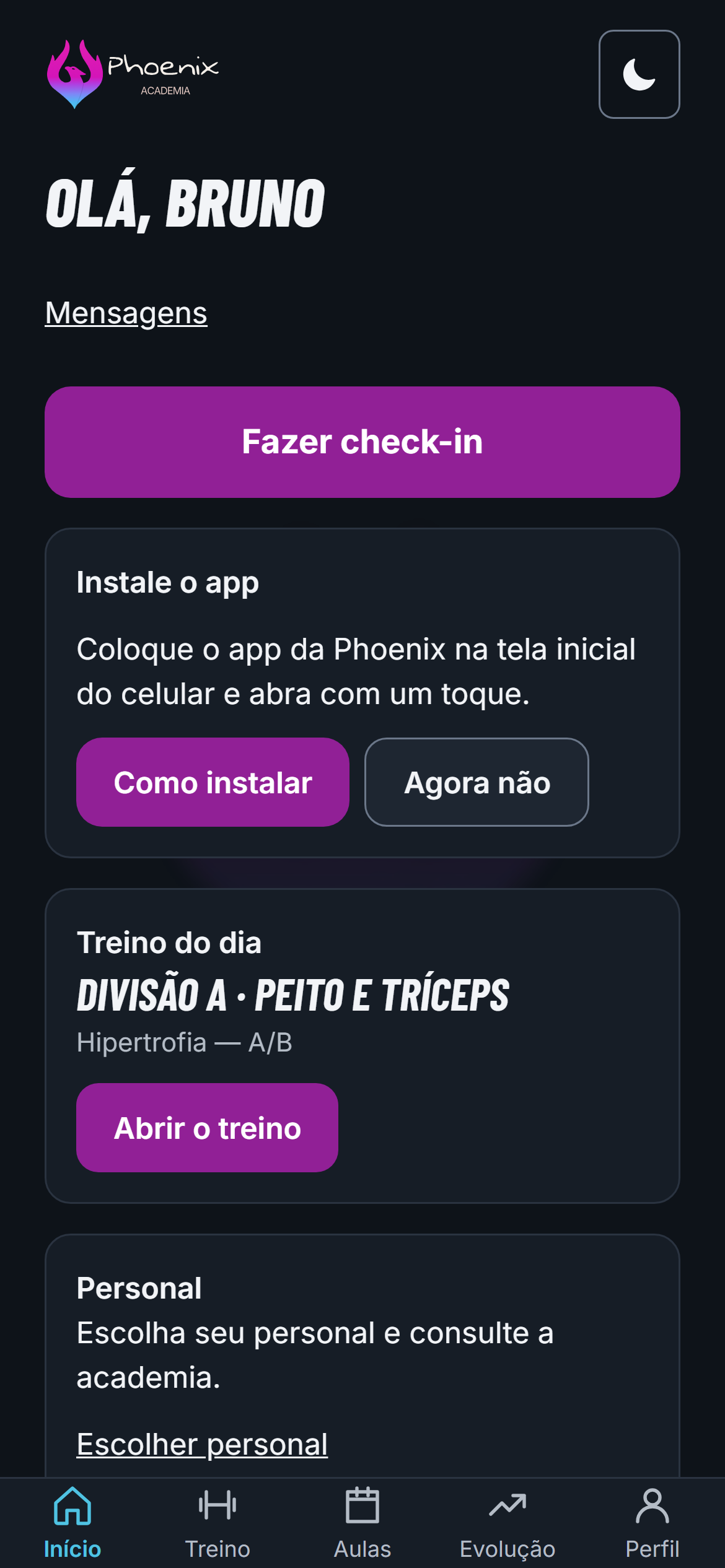
Member app
- Workout sheet that opens even offline
- Load, reps and a rest timer
- 120 exercises demonstrated by a mascot, with the muscle map
- Check-in, class booking, Pix invoices and progress
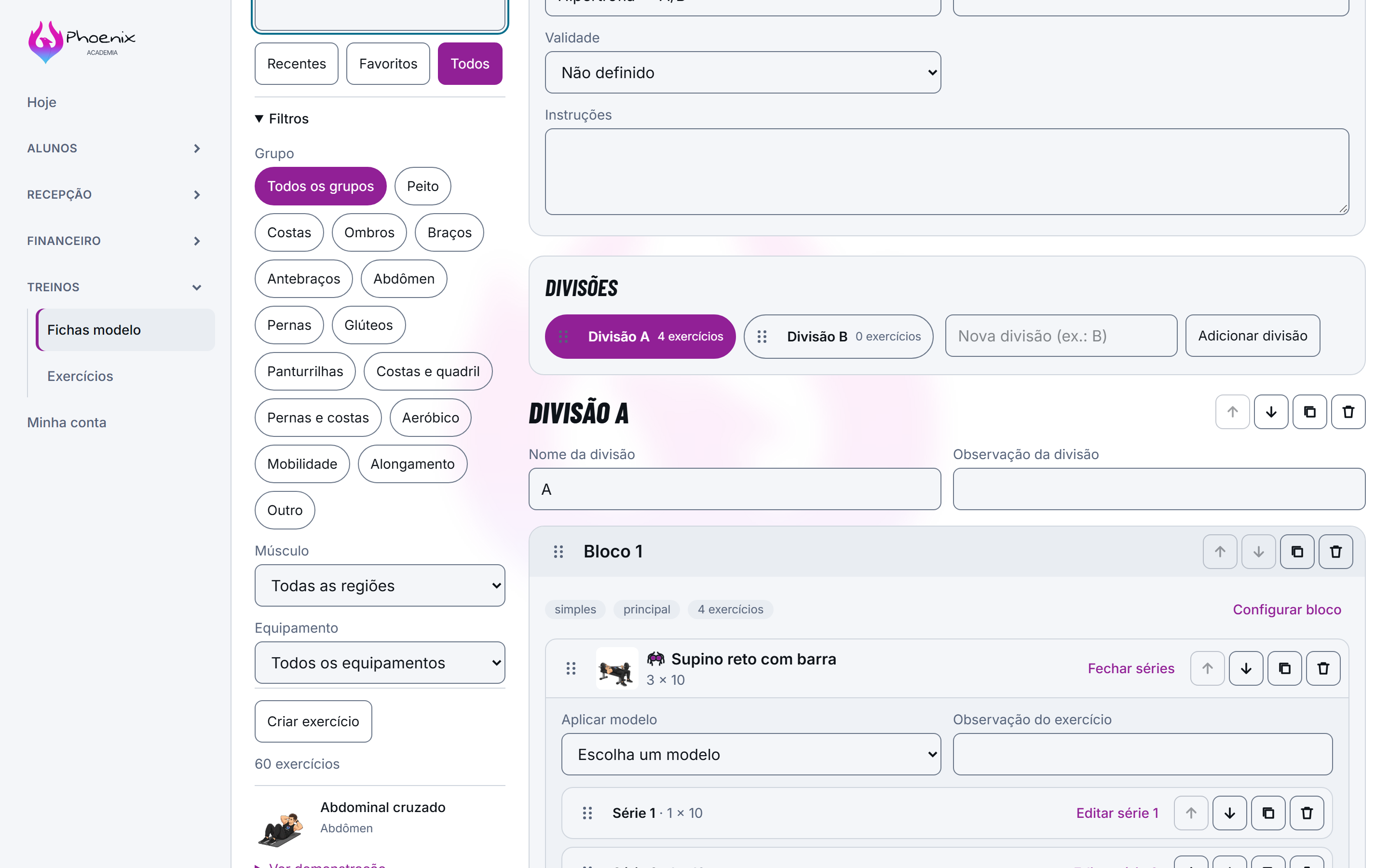
Staff panel
- Workout builder with an exercise library and templates
- Billing with Pix, automatic Pix and card, dunning and cash desk
- Health: anamnesis, PAR-Q and medical certificate
- Front-desk tablet for check-in and contract signing
Published for Phoenix Academia in Itobi
The website, app and dashboard are published on Phoenix Academia’s domain in Itobi, Brazil. Online enrollment and the pilot with the first members are the next steps. The system has 4,689 automated tests and encrypted sensitive data; the technical decisions are explained in the case study.
“Highly recommend it”
Translated from the Portuguese original: “Super recomendo”
How your gym gets the system
I.
Free assessment
You tell me how the gym works today: plans, classes, billing and the system it uses.
II.
Fixed proposal
You get what is included, the timeline and the price, and the work follows a contract.
III.
Your brand and your data
The system takes on the gym’s name, colours and plans. Members from the old system can be imported, when it allows an export.
IV.
Live
Website, app and panel published on the gym’s domain, with 7 days of support after delivery.
How much it costs
- Setup
- Your brand, the plans set up and your members imported.
- Monthly fee
- Server, backups, support and updates.
A 12-month contract. The final price depends on the size of the gym and comes in the proposal, after the free assessment. Pix and card fees are Asaas’s, on the gym’s own account.
Questions from gym owners
Do members have to download the app from a store?
No. The app opens in the phone’s browser and can be installed on the home screen, without the Play Store or the App Store. It works on Android and iPhone.
Does the system carry my gym’s brand?
Yes. The name, logo, colours, plans and domain are your gym’s.
Can I bring over the members from the system I use today?
In most cases, yes: Phoenix had its data imported from its old system. This is assessed in the free assessment, depending on what your current system lets you export.
How do members pay?
By Pix, automatic Pix or card, with billing and reconciliation handled automatically through Asaas.
How much does it cost?
There is a setup fee and a monthly fee, on a 12-month contract. The price depends on the size of the gym and comes in the proposal, after the free assessment.
Do I own the system?
The system is licensed: the code stays with me, and I look after the server, updates and support. The domain, the brand and the members’ data belong to the gym, and it can take the data whenever it wants. If you would rather buy than rent, the proposal changes: the code goes into your name.